
To learn how to download Wurst Client for Minecraft safely, start with the exact Minecraft version. Run that version once, install its Fabric Loader profile, download the matching Wurst JAR and Fabric API JAR, place both files in the active instance's mods folder, then launch Fabric. Use a licensed copy of Minecraft Java Edition.
What you need before downloading Wurst Client
Wurst 7 is a Minecraft Java Edition Fabric mod. It is not a complete Minecraft launcher, a cracked account system or a replacement for the game. The official project states that a licensed Java Edition copy is required. You also need a launcher profile that can run the Minecraft version supported by the selected Wurst file.
Write down the exact Minecraft version before downloading anything. Current examples include Minecraft 26.2 and Minecraft 1.21.11, which is also called 25.4. The Wurst release number is separate: both of those game versions currently have Wurst 7.54.1 files, but each file is compiled for a different Minecraft target.
Modern Wurst installation requires three moving parts: Fabric Loader, Fabric API and Wurst Client. All three must agree with the game version. A current Fabric Loader can support multiple Minecraft releases, but the Fabric API and Wurst JAR filenames remain version-specific.
- Licensed Minecraft Java Edition and a working launcher profile.
- Java runtime selected by the launcher for your Minecraft release.
- Fabric Loader installed for the exact game version.
- Matching Fabric API and Wurst Client JAR files.
- A separate backup of any world you plan to test with mods.
Download the correct Wurst and Fabric files
Use the version matcher on this site's homepage or open the dedicated version directory. The current verified pairing is Wurst 7.54.1 plus Fabric API 0.157.0+26.2 for Minecraft 26.2. Minecraft 1.21.11 uses a different Wurst 7.54.1 JAR and Fabric API 0.141.5+1.21.11.
Read the entire filename before moving it. A normal mod file looks like Wurst-Client-v7.54.1-MC26.2.jar. A file ending in -sources.jar contains project source code for developers and will not run as the mod. Renaming a source JAR or a build for another game version cannot make it compatible.
The download buttons on this site use verified first-party GitHub Release URLs and a 15-second handoff. Files are not mirrored, repackaged or renamed. You can also compare the destination with the official Wurst download index before proceeding.
| Minecraft | Wurst file | Fabric API |
|---|---|---|
| 26.2 | Wurst 7.54.1 MC26.2 | 0.157.0+26.2 |
| 1.21.11 / 25.4 | Wurst 7.54.1 MC1.21.11 | 0.141.5+1.21.11 |
| 1.21.10 / 25.3 | Wurst 7.53 MC1.21.10 | 0.138.4+1.21.10 |
| 1.21.1 | Wurst 7.51.2 MC1.21.1 | 0.116.7+1.21.1 |
| 1.20.1 | Wurst 7.50.3 MC1.20.1 | 0.92.6+1.20.1 |
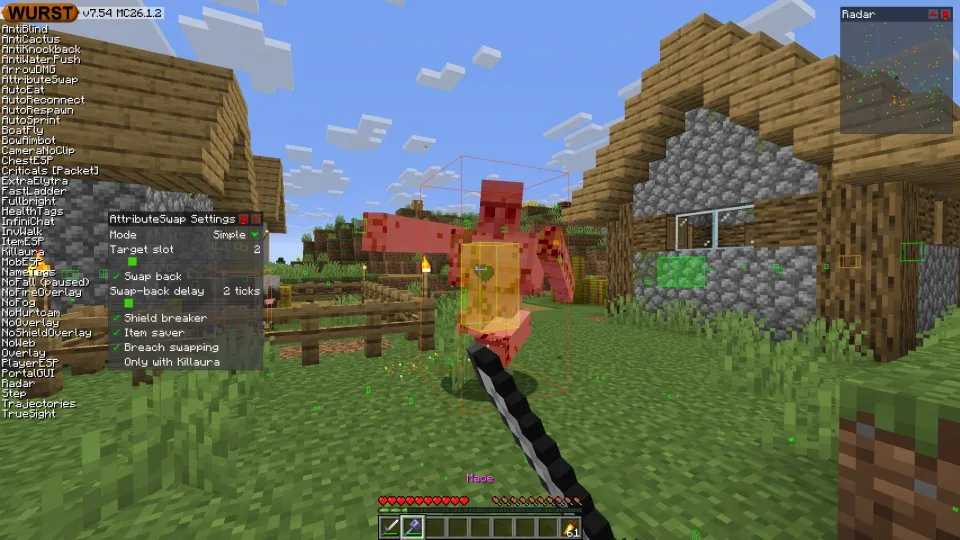
Install Fabric Loader for the same Minecraft version
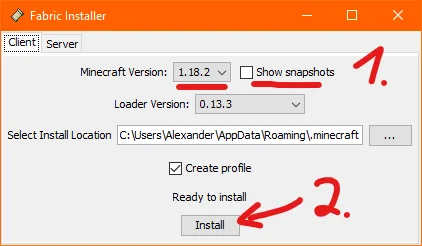
Start the vanilla Minecraft version once before running Fabric Installer. Reaching the main menu confirms that the launcher has downloaded the base game files and created the expected directory. Close Minecraft before the installer changes the launcher profile.
Get Fabric Installer from Fabric's official site, open it with Java, and choose the Client tab. Select the Minecraft version that matches your Wurst filename. Keep the standard game location unless your launcher intentionally stores the instance elsewhere, and leave the option to create a profile enabled.
After the installer reports success, reopen Minecraft Launcher and look for a Fabric profile. Do not launch it yet if you have not added Fabric API and Wurst. If there is no Fabric profile, confirm the installer used the same launcher directory and that the launcher was closed during installation.
- Launch vanilla Minecraft for the target version once, then exit.
- Open Fabric Installer with Java and choose Client.
- Select the exact Minecraft version and confirm the game directory.
- Install the profile, then verify it appears in the launcher.
Put Wurst Client and Fabric API in the active mods folder
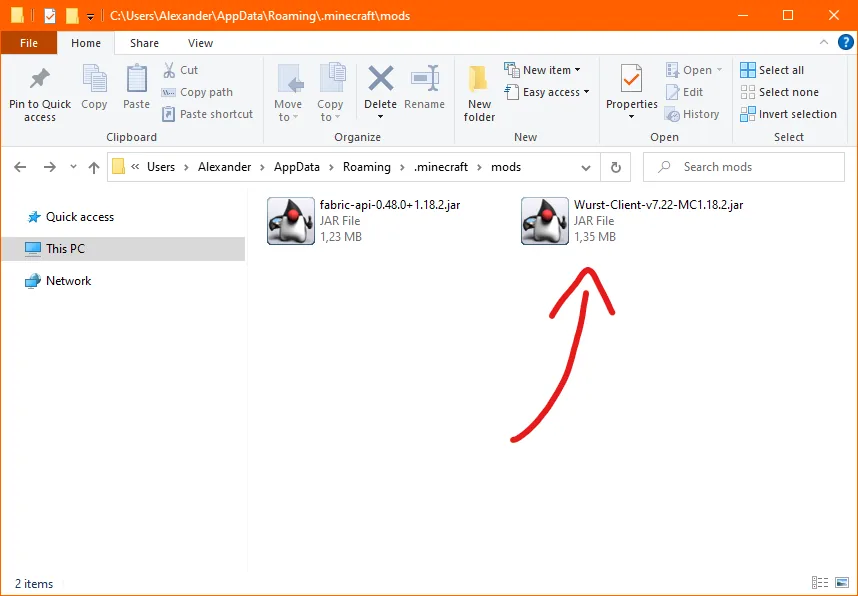
Open the game directory used by the Fabric profile and find its mods folder. The default Windows location is under the current user's AppData Minecraft directory. macOS normally uses the Minecraft folder inside ~/Library/Application Support, while Linux commonly uses ~/.minecraft. Multi-instance launchers may use a completely different folder for each profile.
Place exactly two required files in the folder for a clean test: the matching Wurst Client JAR and matching Fabric API JAR. Remove duplicate Wurst files, source JARs and Fabric API builds for other Minecraft versions. You can restore other compatible mods after the basic profile starts successfully.
Do not extract the JAR files. The loader reads them as archives. If your browser changed the extension or saved a web page instead of the JAR, download again from the verified release destination rather than renaming an HTML file.
Launch the Fabric profile and confirm Wurst loaded
Return to Minecraft Launcher, select the Fabric profile built for the target game version and press Play. The first modded launch may take longer while Fabric prepares caches. Wait for the main menu instead of starting the launcher repeatedly.
If Minecraft opens as vanilla, you probably selected the wrong launcher profile or edited another instance's mods folder. Confirm the profile name, inspect its game directory and verify that the title screen indicates a modded Fabric environment. Wurst settings and keybinds can then be reviewed in-game.
Test in a new single-player world before opening an important save or joining a server. Wurst is a hacked client; servers can prohibit it and ban accounts for disallowed modifications or behavior. Installation success does not mean a multiplayer server permits its use.
Windows, macOS and Linux installation differences
The Wurst mod JAR itself is cross-platform because Minecraft Java Edition runs on Java. The practical differences are how the operating system opens Fabric Installer, where the launcher stores profiles and whether security prompts block an unrecognized downloaded file.
On Windows, choose Open with Java if a double-click does not start the Fabric installer. On macOS, Finder hides the user Library folder by default; use the Go menu while holding Option or open the instance directory from the launcher. macOS may also require approval in Privacy & Security for a downloaded Java tool. On Linux, ensure the installer runs with the same user account that owns the Minecraft directory.
Do not bypass operating-system warnings for a file from an unknown mirror. First confirm that the browser reached FabricMC or the Wurst-Imperium GitHub organization. This guide never requires disabling antivirus, Gatekeeper or browser protection globally.
| System | Typical issue | Practical check |
|---|---|---|
| Windows | JAR opens as an archive | Choose Java to run Fabric Installer; do not extract Wurst |
| macOS | Library folder is hidden | Open the instance directory from the launcher or use Finder's Go menu |
| Linux | Wrong home/profile permissions | Run the launcher and installer as the same normal user |
Troubleshoot Wurst installation errors
An incompatible mod set message normally identifies the exact Minecraft or Fabric dependency mismatch. Read the first lines rather than the final generic crash notice. Compare the Wurst filename, Fabric API filename, Fabric profile version and the Minecraft version shown in the launcher.
If Fabric says a dependency is missing, confirm Fabric API is a JAR in the same active mods folder. If it says the wrong game version is required, replace the mismatched file. If the game crashes only after other mods return, isolate the conflict by restoring those mods one at a time.
If no error appears but Wurst is absent, check that the launcher used the intended directory. This is especially common with Feather, Dawn, Prism, CurseForge and other multi-instance launchers. A mod placed in the default Minecraft folder cannot affect a profile stored elsewhere.
| Symptom | Likely cause | Fix |
|---|---|---|
| Missing Fabric API | Dependency JAR absent or in another folder | Download the matching API and use the active instance |
| Wrong Minecraft version | Wurst or API filename targets another release | Replace the file; never rename it |
| Sources JAR crash | Developer source archive installed | Use the main Wurst-Client JAR |
| Vanilla launch | Wrong profile selected | Select the Fabric profile and verify its directory |
| Crash with modpack | Loader or mod conflict | Test Wurst plus Fabric API in a separate clean instance |
How to download Wurst Client FAQ
Is Wurst Client free to download?
Yes. The official Wurst project is free and open source. Use its first-party download or GitHub Release links rather than paid or repackaged mirrors.
Do I install Wurst with Fabric or Forge?
Modern Wurst 7 builds use Fabric and require Fabric API. The historical ForgeWurst project is for old Minecraft 1.10.2 through 1.12.2 versions.
Can I install Wurst Client on Mac?
Yes, for supported Minecraft Java Edition versions. Use Java to run Fabric Installer and place the same matching JAR files in the Mac launcher's active instance folder.
Why is there no Wurst installer EXE?
Modern Wurst is distributed as a Fabric mod JAR. Fabric Installer creates the loader profile; the Wurst and Fabric API JARs stay in the mods folder.
Can I use Wurst Client on a server?
Technically the client can connect, but server rules may prohibit it and operators may ban the account. Review the rules before joining.
Does Wurst work on Bedrock Edition?
No. Official Wurst downloads are Java Edition mod JARs and cannot run as Bedrock add-ons, APKs or console packages.
How do I download Wurst Client for Minecraft 26.2?
Choose Minecraft 26.2 in the version matcher and use Wurst 7.54.1 with Fabric API 0.157.0+26.2. Put Wurst-Client-v7.54.1-MC26.2.jar in the active Fabric instance.
How do I download Wurst Client for Minecraft 1.21.11?
Open the Minecraft 1.21.11 version page and pair Wurst 7.54.1 MC1.21.11 with Fabric API 0.141.5+1.21.11. Do not use that JAR in a 26.2 profile.
Sources and related guides
Version and release facts were checked against the official Wurst and Fabric project pages on August 13, 2026.