
Download Wurst Client for Minecraft 26.2
The first-party Wurst 7.54.1 release page lists this file for Minecraft 26.2. It is the current stable game-version target in the official download index.
Wurst-Client-v7.54.1-MC26.2.jar
The Wurst file is handed off to Wurst-Imperium's GitHub Release. Fabric API is handed off to FabricMC's GitHub Release. Neither file is hosted, renamed or repackaged by this site.
Wurst Client 26.2 download file facts
| Minecraft version | 26.2 |
|---|---|
| Wurst version | 7.54.1 |
| Mod loader | Fabric |
| Required dependency | Fabric API 0.157.0+26.2 |
| Filename | Wurst-Client-v7.54.1-MC26.2.jar |
| File size | 1.78 MB (1,865,681 bytes, GitHub response checked August 13, 2026) |
| Release record | Released August 4, 2026; updated August 13, 2026 |
| Source status | Verified against the first-party Wurst download and release pages on August 13, 2026 |
How to install Wurst Client 26.2
Wurst 7.54.1 is a Fabric mod for this game version. Installing the JAR alone is not enough: the launcher must start a Fabric profile for Minecraft 26.2, and the matching Fabric API JAR must be in the same active mods directory.
- Run vanilla Minecraft 26.2 once, reach the title screen, and close the game.
- Run Fabric Installer and choose Minecraft 26.2. Keep the standard game directory unless your launcher intentionally uses another instance folder.
- Open the selected instance's
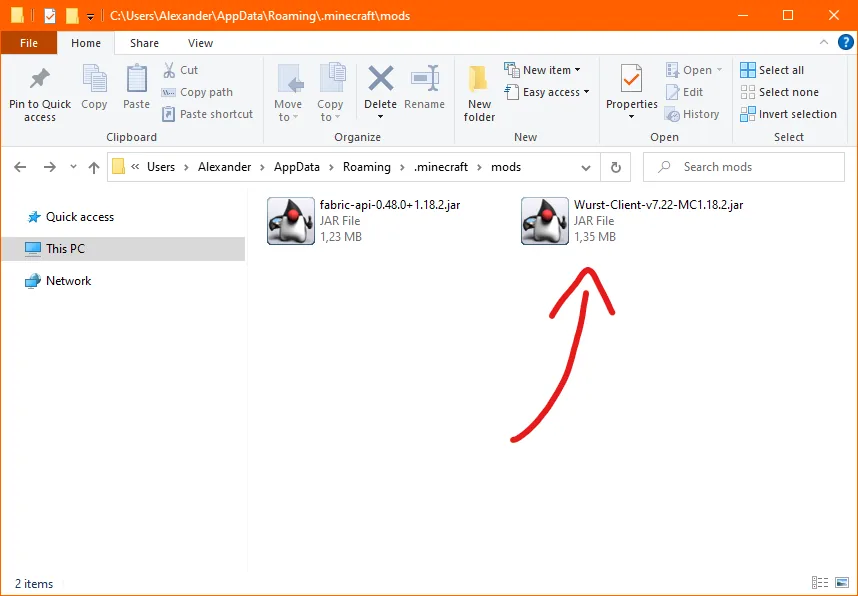
modsdirectory. Create it only if the Fabric profile has been installed and the folder is still missing. - Add
Wurst-Client-v7.54.1-MC26.2.jarand the Fabric API 0.157.0+26.2 JAR. Remove other Wurst or Fabric API builds that target a different Minecraft release. - Choose the new Fabric profile in Minecraft Launcher and press Play. The Wurst UI should be available after the game reaches its main menu.
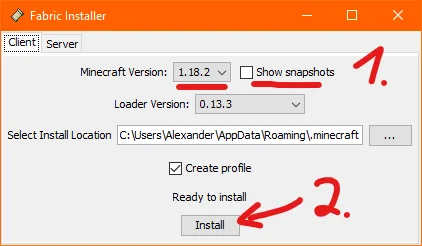
Windows usually stores the default game directory under %AppData%\.minecraft. On macOS it is normally under ~/Library/Application Support/minecraft, and Linux commonly uses ~/.minecraft. Third-party launchers can isolate every instance in a separate directory, so always open the folder from the profile you actually launch.
Compatibility and loader requirements
This build targets Minecraft 26.2 and the modern Fabric stack. It does not target the 26.3 snapshots also listed on the release page; snapshot filenames are separate and should not be used in the stable 26.2 profile.
Do not try to load this verified Fabric file directly in a Forge or NeoForge profile. A launcher can support multiple loaders, but each individual profile runs one compatible loader and mod set. If you use Feather or Dawn, confirm that its custom-mod mode creates a Fabric instance for Minecraft 26.2 before importing these files.
This download is for licensed Minecraft Java Edition. It is not a Bedrock add-on, APK, HTML client or standalone game launcher. Java mod JARs cannot be installed in Minecraft for Android, iOS, Xbox, PlayStation, Switch or Bedrock for Windows.
Verify your Wurst Client 26.2 download before launch
Before opening Minecraft, compare the downloaded file with the facts table on this page. The Wurst filename must contain 7.54.1 and the Minecraft target 26.2. The Fabric API filename must target the same game release. A browser may add a duplicate suffix such as (1), but it should not change the original .jar extension or the version identifiers inside the name.
A clean first launch is the fastest compatibility test. Create a separate Fabric instance, add only Wurst-Client-v7.54.1-MC26.2.jar and Fabric API 0.157.0+26.2, then start a local single-player world. If that minimal profile reaches the title screen, add other mods back one at a time. This isolates an unrelated mod conflict without blaming the Wurst Client 26.2 download file or repeatedly replacing a correct download.
Keep the original release URLs with your instance notes. When Wurst or Fabric API publishes an update, return to the page for Minecraft 26.2 and compare all three version labels again. Do not overwrite a working profile merely because another Minecraft branch has a higher Wurst number. Back up important worlds and configuration before changing the loader, game version or mod set.
Fix common 26.2 installation errors
“Incompatible mod set” or dependency error
Compare the Minecraft version embedded in every filename. A Wurst 26.2 build cannot be repaired by renaming it, and a Fabric API made for another Minecraft version can stop Fabric before the title screen appears. Replace the mismatched file instead of stacking additional copies in the folder.
The game launches without Wurst
Check the selected launcher profile. If the title screen does not identify a modded Fabric environment, the launcher probably started vanilla Minecraft. Also confirm that the profile's game directory is the same directory where you placed the two JAR files.
The game crashes after adding the download
Minecraft 26.2 requires the corresponding current Java and Fabric environment. If an older launcher-managed Java runtime starts the profile, update the launcher's runtime rather than replacing the Wurst JAR with a file for another game version.
A file ending in -sources.jar contains source code for developers and will not work as the mod. Use exactly Wurst-Client-v7.54.1-MC26.2.jar. When troubleshooting, temporarily remove unrelated mods, start with only Wurst and Fabric API, and then restore other compatible mods one at a time.
Source, update and account-safety notes
This page verifies release metadata against Wurst's first-party pages and routes the final file request to the project's GitHub organization. You can independently inspect the official Minecraft 26.2 download index, the Wurst 7.54.1 release notes, and the open-source Wurst repository.
Wurst is a hacked client, and multiplayer servers can prohibit it. Installing the file successfully does not grant permission to bypass a server's rules, anti-cheat system or moderation policy. Use a separate test world to confirm the profile works, and understand that server operators may suspend or permanently ban accounts for prohibited modifications.
Wurst Client 26.2 download FAQ
Which Wurst version works with Minecraft 26.2?
7.54.1 is the verified build identified by the first-party Wurst download page for Minecraft 26.2 as checked on August 13, 2026.
Do I need Fabric API for Wurst 7.54.1?
Yes. Use Fabric API 0.157.0+26.2 for this version and keep it in the same active mods folder as the Wurst JAR.
Can I use this Wurst download on Mac?
Yes, when Minecraft Java Edition, Java, Fabric Loader and the matching files all run on the Mac. The mod JAR is the same; the instance folder location and Java permissions differ.
Can I install this build with Forge or NeoForge?
No. The verified file linked on this page is a Fabric build. Use a Fabric profile or read the loader compatibility guide before downloading a different community project.
Is this a Bedrock or Eaglercraft download?
No. It is a Minecraft Java Edition mod JAR. There is no verified official Bedrock, APK or Eaglercraft HTML equivalent linked by Wurst's first-party release page.